From an AI image brief to targeted revisions and three-format delivery
Use recorded AI conversations to structure a brief and turn defects into revision requests. Inspect character consistency, reserved space and delivery conditions using editor-drawn before/after SVGs and three completed formats.
About 35 min readingAs of Oct 2026
Lesson guide · goals & preparation
By the end of this guide
- Separate an informal brief into an image request, open questions and inspection conditions.
- Turn observed defects into scoped revision requests with preserved traits.
- Recompose formats while retaining character identity and checking the actual files.
Who this is for
- Non-specialists who want to use AI for promotional or series artwork
- Readers who can obtain a first image but need a concrete revision process
What you need
- The earlier lessons on image requests and character consistency are useful preparation.
- Read the recorded conversation and completed mockups without an account. Running an image tool is optional.
This lesson’s terms, in plain language
Read the short meanings here. Open a term for a fuller explanation and example.
This reading lesson explains how to use external AI tools. Read from theory to the workflow, examples and explanations, or use the contents to jump to a section.
1 / 4
Theory
Understand what to ask AI to do, how to ask, and the ideas behind the workflow.
Separate the AI tasks before asking for an image
Three illustrations arrive for a book-club announcement. The landscape looks useful, but the square cuts off the shoulder bag and the vertical moves the mascot’s yellow badge to the opposite side. Asking for “the same feeling” gives the model little information about the required repair. This lesson follows one case from the initial request through corrections and delivery, showing what to send to an AI, what to keep from its reply and what still needs inspection.
The workflow to understand is: Extract subject, scene and constraints from the brief → structure an image request → identify specific revisions → preserve character features → check composition and delivery requirements for each format. First learn why each input and constraint matters, then study the requests, finished examples and explanations. This is a reading lesson about external AI tools; no account or runtime is required.
There are two distinct AI tasks. A conversational assistant can turn a short brief into a clearer image request and organise observed defects into an editing plan. An image-generation tool produces or revises the artwork from instructions and references. A well-written request is not evidence that the resulting image follows it. Even when a reply says that a feature will be preserved exactly, its actual colour and position need checking in the file.
A brief is simply a short set of working conditions: who will see the picture, where it will appear, what must be present and what space must stay empty. The fictional client is a neighbourhood library running a beginner book club. The date, venue and fee have not been decided. A plausible event detail added by a model does not become a confirmed fact.
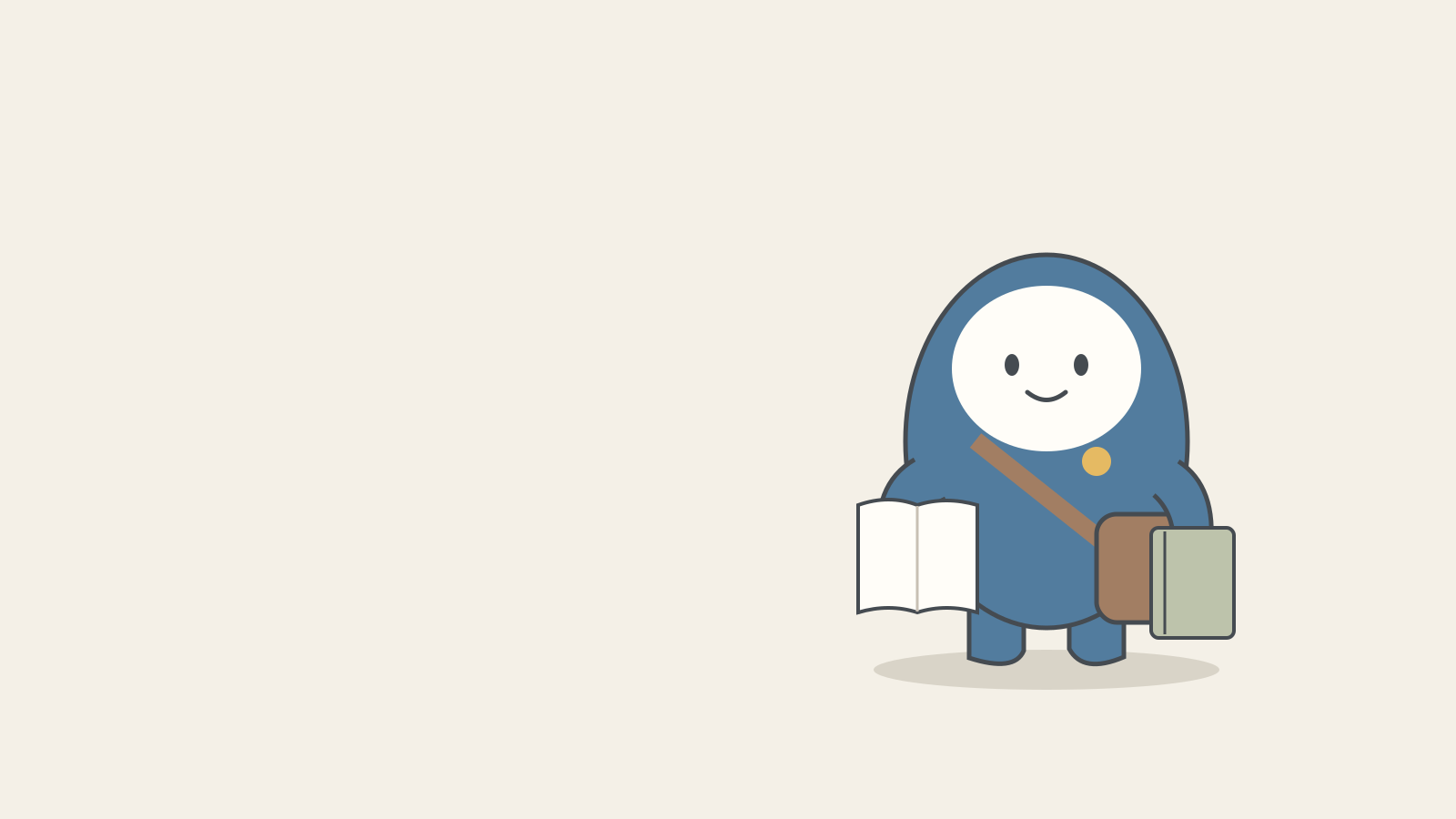
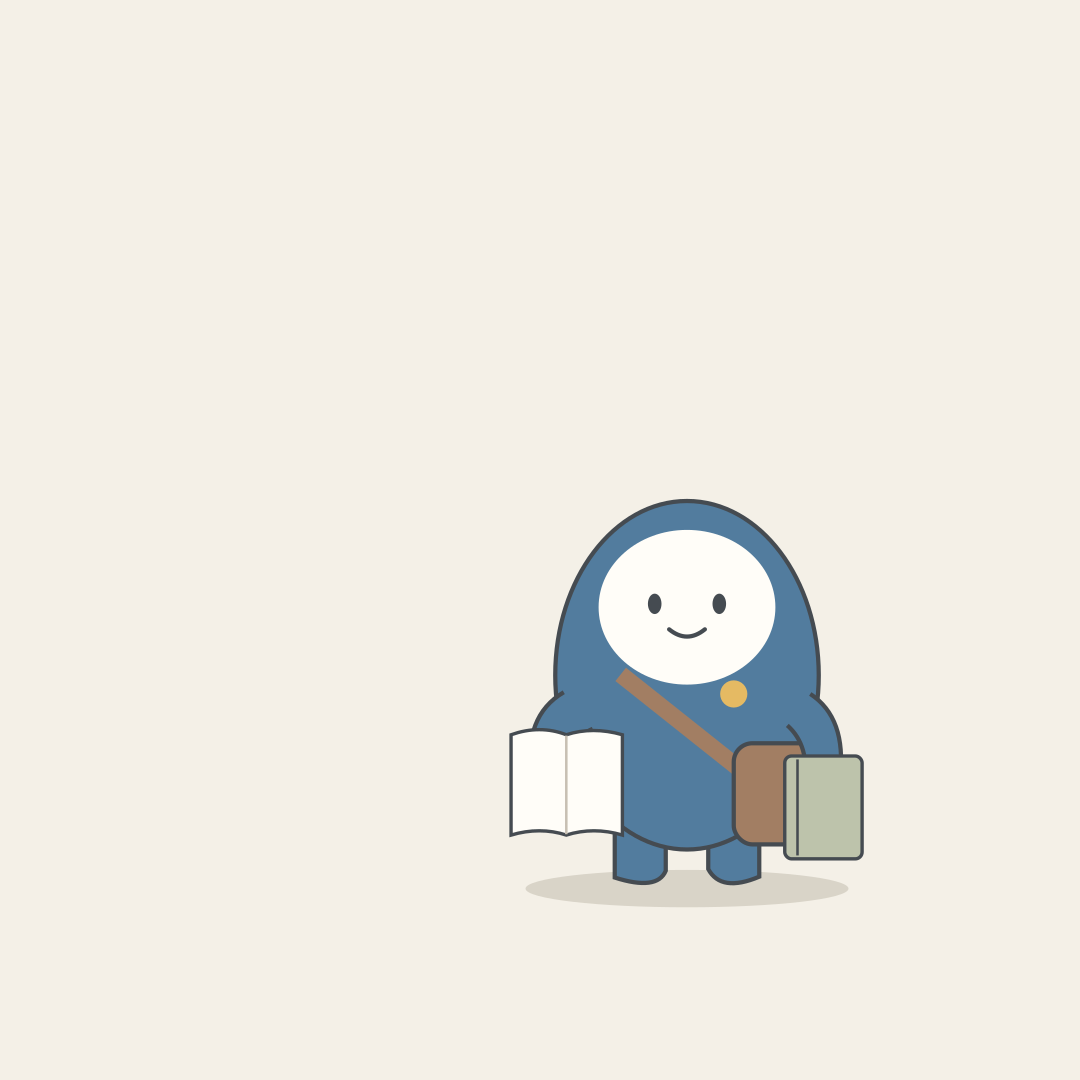
Dori is an original fictional mascot for this lesson: a round blue body, white oval face, brown shoulder bag and one yellow circle on the chest at the viewer’s right. Dori holds a book and a notebook; event copy will be added separately. Shape, colour, count and position make the request inspectable in a way that “a cute character” does not.
The three text requests were actually sent to Claude Sonnet 5.5 in October 2026, continuing the same conversation. The language-specific replies below are reproduced unchanged. The before-and-after pictures and delivery SVGs are editor-drawn instructional mockups, not images generated by an AI. Image-tool instructions are based on official help pages. You can follow the examples without an account; using a tool yourself is optional.
Prepare the source brief and inspection rules together
Freeze the source brief before the first request. The purpose is a book-club announcement; the style is relaxed paper collage on a cream background. The deliverable is three text-free illustration bases. The undecided date, venue and fee are part of the source information too. Without that boundary, an assistant may expand the assignment into promotional copy and invent a location or a free-admission offer.
Fixed conditions are the features that must survive all three versions. The target colours are #527c9e for Dori’s body, #fffdf8 for the face, #a27e63 for the bag and #e5ba63 for the badge. These six-digit colour codes let an editor specify the same colour again. They are inspection targets, not a promise that a generative model will reproduce exact values. Where precise brand colours matter, check and adjust them in an editor.
Also state what may change: the character’s placement and size, and the surrounding empty space. Changing the face, bag or badge direction would undermine the consistent character. “Right” can mean the character’s right or the viewer’s right, so this case consistently specifies the viewer’s perspective. A reference picture and a written feature list provide complementary checks.
A safe margin keeps essential artwork away from the edges. For this exercise, landscape 1600×900 uses 80 pixels on every side, square 1080×1080 uses 64, and vertical 1080×1920 uses 96 left and right with 180 top and bottom. These are arbitrary exercise requirements, not official rules for any publishing platform. Check the actual destination’s current requirements when preparing a real publication.
The left 45% of the landscape is 720 pixels: 1600 multiplied by 0.45. Keeping that area clear leaves room for a readable title. The square and vertical versions reserve space at the top instead. Empty space is a delivery requirement here, so filling it with decorative leaves is a defect even if the result looks attractive. Include the purpose of that space in the source brief.
The fictional delivery requirements for this lesson Category Confirmed requirement AI task Artwork One Dori, book and notebook, no event text Turn facts into an image request Fixed traits Blue body, white face, brown bag, one viewer-right yellow badge Identify missing constraints Landscape 1600×900; keep left 720px empty Propose placement Square / vertical 1080×1080 / 1080×1920; keep top empty Request recomposition Undecided Date, venue and fee Keep as questions; do not invent
2 / 4
Step-by-step use
Learn what to prepare, how to request help and how to revise the result through examples and explanations.
First request: turn the brief into an image request and open questions
Do not begin with “make a beautiful poster.” First ask a conversational assistant to separate the image request, unresolved questions and review criteria. A poster normally combines artwork and event copy, but this brief does not yet have a date or venue. The immediate deliverable is an instruction for an illustration base, together with a visible list of missing information.
The actual request below was sent in Korean. Its English version is a reader-facing translation; the English reply was produced by the model in the same call. The reply preserves the undecided date, venue and fee, and identifies the need to decide how the square and vertical layouts will be recomposed. Retaining those open questions is a useful outcome of the text step.
Compare the proposed request against the source before copying it. It must retain one Dori, the book and notebook, one viewer-right badge and the empty left 45%. An added bookcase or extra participant might fit the general theme yet still conflict with this brief. Check whether such additions consume the title space or change the character count; remove them if they do not serve the request.
The first reply also demonstrates a real formatting failure. We requested no more than 700 characters per language, but the returned English field contains 987 characters including spaces and punctuation. That is a direct string-length measurement. Correct ideas and compliance with an output limit are separate checks. If a tool requires a shorter prompt, ask for only the image-request portion to be shortened while preserving the character, reserved space and prohibition on generated text.
For optional image generation, supply the approved request and reference image and specify the desired aspect ratio. OpenAI’s help explains creating an image from a description or uploading one and describing changes. We did not execute that image-generation step for this lesson. Nor does requesting 1600×900 prove that the saved file has those pixel dimensions: inspect the actual output separately.
The actual continued AI conversation Turn Requested task 1 Structure the brief into request, open questions and checks 2 Turn observation notes into two scoped edits 3 Fix character traits, recompose three formats and specify failed checks Download the three original AI replies (TXT)
Example prompt We are recording a real AI conversation for teaching. Answer in text only; do not generate images or edit files. Turn this fictional brief into a request for an image tool: a beginner book club at a neighbourhood library, a relaxed paper-collage style, one fictional mascot Dori with a round blue body, white oval face, brown shoulder bag and exactly one small yellow circle on the chest at the viewer’s right. Dori holds a notebook and a book. No book titles, event name, date or logo in the image. Cream background. First master in a 1600×900 ratio, left 45% empty for later title placement, Dori on the right. Delivery formats: 1600×900, 1080×1080 and 1080×1920. Date, venue and price undecided. Return only a JSON object with ko and en string fields, each at most 700 characters, distinguishing image request, open questions and review criteria. Do not invent event facts or say you generated the image.
Worked example & explanation Actual Claude Sonnet 5.5 reply (October 2026, complete language field):
Example responseA teaching example of a workflow in an external AI tool. Results vary with the request and context.
①Image request: A cozy paper-collage illustration for a beginner book club at a neighborhood library, on a cream background. One mascot, 'Dori': round blue body, white oval face, brown shoulder bag, and one small yellow circle on the chest at the viewer's right. Dori holds a notebook and a book. First master at 1600×900 landscape; the left 45% stays empty for a title added later, with Dori in the right area. Do not generate any book title, event name, date, logo, or other text. ②To confirm: date, venue, and price are undecided, so none appear in the art; add them later once settled. Also decide the title wording and how the 1080×1080 square and 1080×1920 vertical versions are composed (recompose or extend the background). ③Review criteria: exactly one Dori; body, face, bag, and a single yellow circle on the viewer's right chest match the spec; notebook and book present; left 45% empty; no text, numbers, or logos; cream background with paper-collage texture; 1600×900 ratio.
Check it
- Compare conditions against the source and separate model proposals from verified file properties.
Revision request: separate three observed defects into two edits
The deliberately flawed mockup contains three defects: a green body, a yellow badge on the viewer’s left and a large leaf in the reserved title area. The white face, brown bag, book and notebook are correct. The editor created this SVG to make the differences visible; it is not evidence that an image model actually produced these three mistakes together.
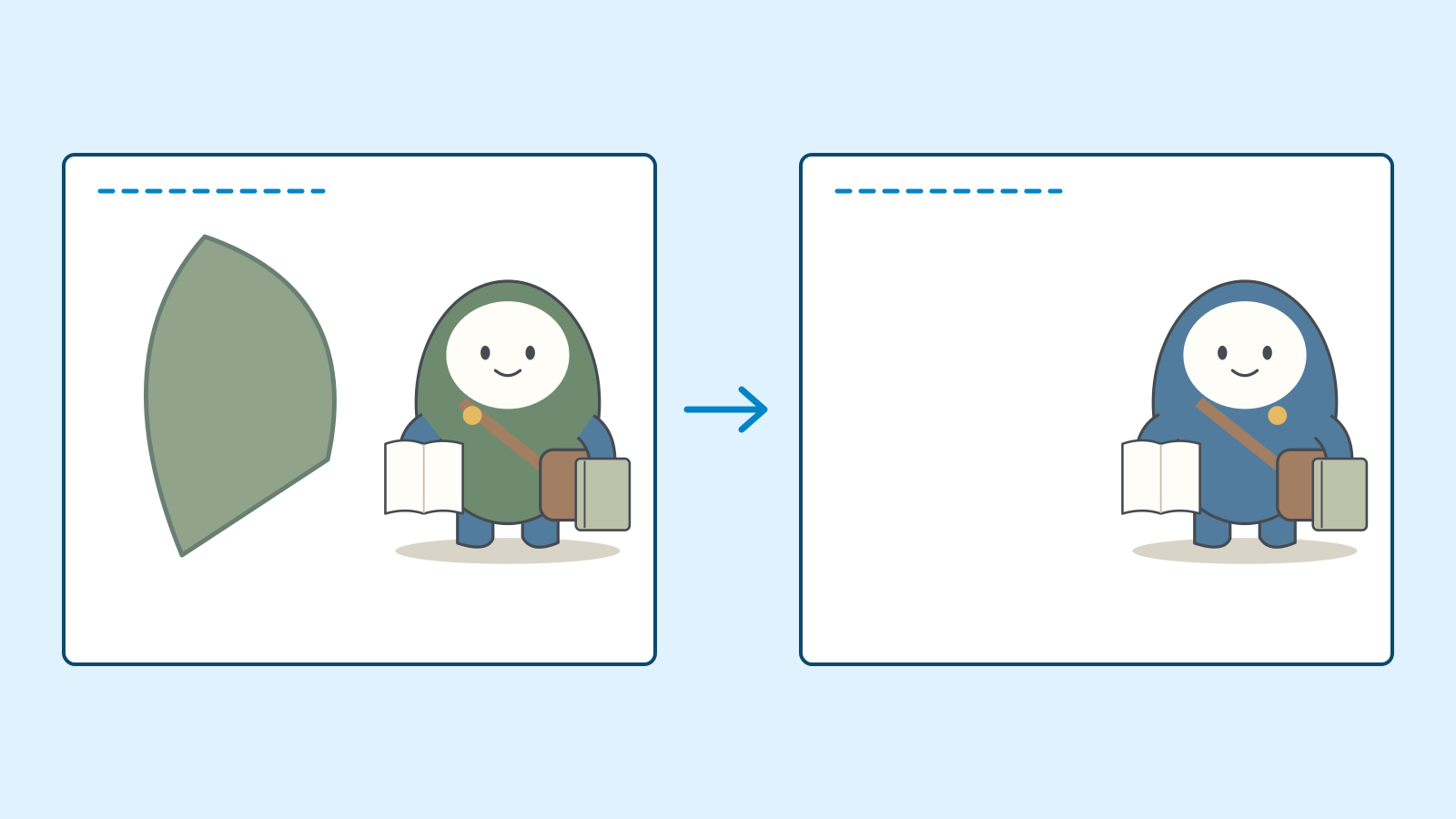
Figure: changes to Dori’s colour, badge side and title space. Editor-drawn instructional mockups, not actual AI-generated results · AI Ping “Wrong colours and too busy” is hard to act on. Describe the observable differences: remove the leaf from the left title area, change the body to the target blue and move the badge to the viewer’s right. Include the parts that are already correct. Stating that the face, bag, props and pose should survive provides a comparison rule after editing.
No image was attached to the second actual request. The reply therefore reorganises our observation notes rather than reporting what the model saw. It proposes clearing the left title area first, then correcting the body and badge. Separating distant problems into two edits is useful. Whether the selected body region also touches the face or bag strap still requires inspection in the real editor.
If trying this yourself, ChatGPT allows opening an image, selecting an area and describing the change. Its official instructions caution that edits may extend outside the selection. In Adobe Firefly, upload an image, choose Fill and brush over the relevant area before requesting a change. Interface names can change; the official links below are the reference. These are documented procedures, not a claim that we performed those image edits.
Compare the entire image after each edit. A removed leaf does not compensate for an altered expression or bag colour. Keep separate versions so you can return to the previous state. If two attempts at one correction repeatedly damage fixed traits, consider retaining the original character and placing it in an editor instead of continuing regeneration. That stopping rule is an explicit choice for this exercise.
Example prompt This is a follow-up on the same brief. No image is attached. These are observation notes about an editor-drawn instructional mockup; do not say you viewed it. The body is green, the yellow badge is on the viewer’s left chest and a large decorative leaf fills the left title area. The face, bag, notebook and book are correct and Dori is on the right. Write a revision request dividing the three defects into two edits. For each, identify the selected region, changes, preserved details and whole-image checks. Avoid repeatedly regenerating the whole image. Briefly mention possible changes outside the selected region. Return only ko and en strings in JSON, at most five sentences per language. Do not perform the edits.
Worked example & explanation Actual Claude Sonnet 5.5 reply (October 2026, complete language field):
Example responseA teaching example of a workflow in an external AI tool. Results vary with the request and context.
This request is based on the editor's observation notes, not on viewing the image, and it avoids regenerating the whole picture by splitting the fixes into two region edits. Edit 1 selects only the left 45% title space, removes the large decorative leaf, and fills it with the same cream color and paper texture as its surroundings, while preserving the entire right area with Dori, the bag, the notebook, and the book. Edit 2 selects only Dori's body, changes the green to blue, erases the yellow circle on the left chest, and adds one small yellow circle on the chest at the viewer's right, while preserving the white oval face, brown shoulder bag, the notebook and book in hand, and Dori's pose and position. After each edit, re-review the whole image regardless of the selected region: one Dori, round blue body, white oval face, brown bag, exactly one yellow circle on the viewer's right chest, notebook and book, left 45% empty, no text, numbers, or logos, cream background with collage texture, 1600×900. The model may change things outside the selection, such as the expression, bag color, background tone, leaf remnants, a leftover yellow circle, or texture, so compare side by side with the pre-edit image and, if anything drifts, undo only that edit and retry with a tighter region.
Check it
- Compare conditions against the source and separate model proposals from verified file properties.
Follow-up request: preserve the character and recompose three formats
Changing the landscape into a square or vertical layout is more than shrinking it. The three aspect ratios are 16:9, 1:1 and 9:16. Cropping the same picture can remove props; stretching width and height independently distorts the face. Instead, preserve the character’s shape and recompose its position and the surrounding space.
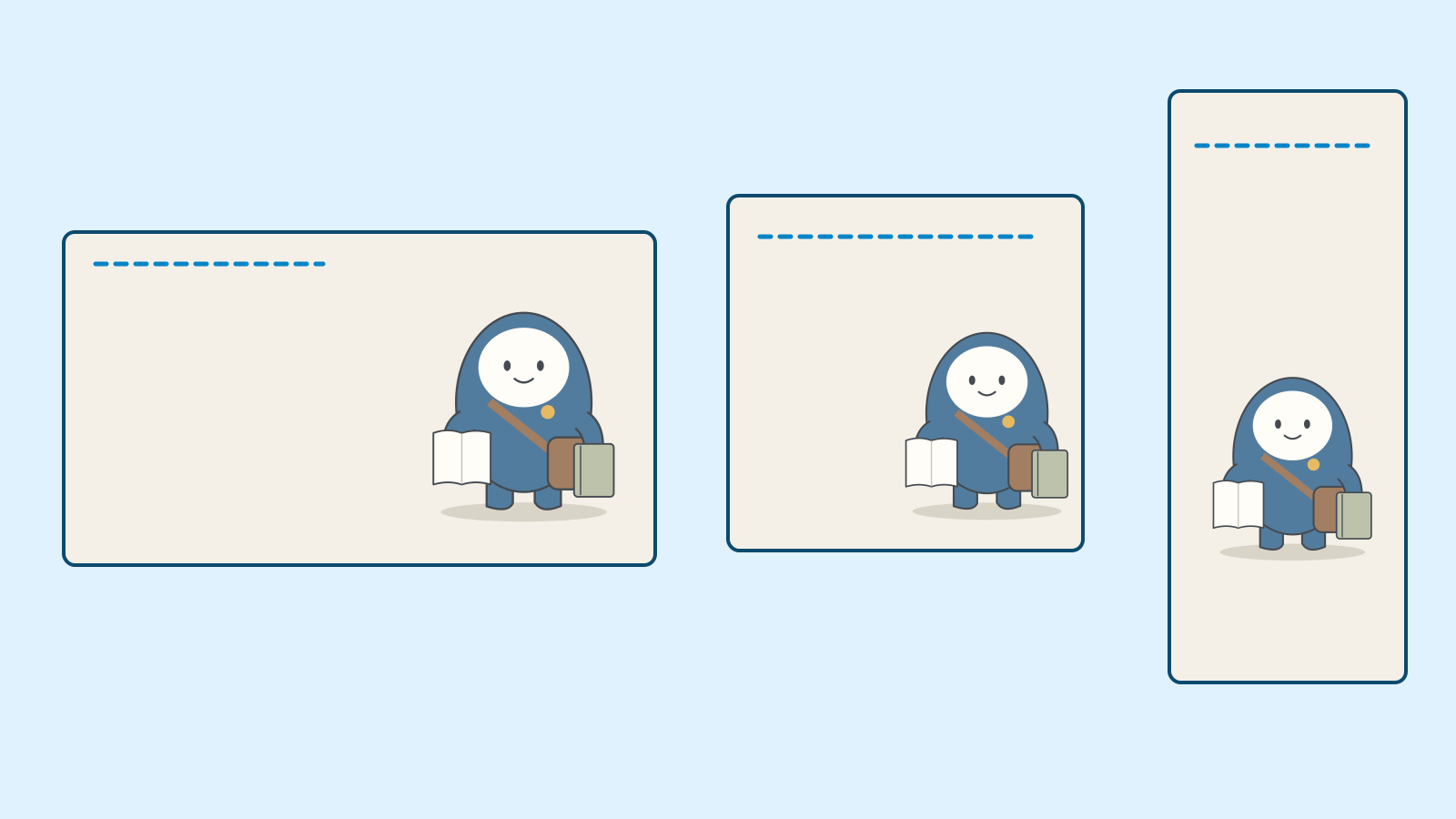
Figure: editor-drawn mockups recomposing the same Dori artwork in three formats · AI Ping The third actual request adds colour codes and format-specific margins. Essential fixed conditions are repeated rather than assumed to survive from earlier turns. The assistant is asked for character invariants, recomposition instructions and what should be returned after a failed check. Its output is an editing and inspection plan, not the artwork itself. The reply explicitly retains that distinction.
A useful part of the returned plan is to revisit only the failed format. If landscape and square pass but the vertical cuts off the bag, request a correction to the vertical file with the defect identified. Consider moving the character inward or reducing it proportionally. Retain the passing files and compare the replacement against them before accepting the set.
One gap still requires human judgement: the model says that the editor must choose a colour tolerance, but this exercise has not defined one for generated images. “Looks similar” is therefore not a completed colour check. The supplied SVGs use editor-assigned solid colours, which can be checked exactly in code. A photograph-like output with lighting and gradients would require a separately agreed tolerance rather than the same single-colour rule.
The completed mockups reuse the same Dori drawing: right-aligned in landscape, lower in the square and lower-centred in the vertical. They do not mirror the character, so the badge stays on the same side. Compare how the reserved space changes. The text model helped organise the requirements; the editor set the actual SVG placement and dimensions. Recording those roles separately prevents a good request from being mistaken for a verified final file.
Editor specification for exact colours, placement and safe regions Item Recorded values Character Four colour codes, one Dori and one yellow badge Delivery Dimensions, safe region and title region for every file Origin Editor-drawn SVGs, not actual image-generation outputs Download the delivery specification (JSON)
Example prompt Keep Dori’s fixed traits and three delivery formats. Body #527c9e, face #fffdf8, brown bag #a27e63, exactly one yellow circle #e5ba63 on the viewer’s right chest. These are editor-inspection targets, not guaranteed generation values. Exercise-specific margins, not platform rules: landscape 1600×900, 80px on all sides; square 1080×1080, 64px on all sides; vertical 1080×1920, 96px sides and 180px top/bottom. Keep left 45% empty in landscape and reserve top space in square and vertical. Deliver text-free illustration bases; do not add undecided event details. Give fixed traits, recomposition requests and what to return after failed checks as ko/en strings in JSON, at most six sentences each. Do not simply crop landscape into vertical. Distinguish numeric and visual checks. Do not claim actual generation or inspection.
Worked example & explanation Actual Claude Sonnet 5.5 reply (October 2026, complete language field):
Example responseA teaching example of a workflow in an external AI tool. Results vary with the request and context.
This is a checklist design, not the result of actually generating or reviewing any image. ①Fixed character conditions: exactly one Dori, round blue body #527c9e, white oval face #fffdf8, brown shoulder bag #a27e63, exactly one yellow circle #e5ba63 on the chest at the viewer's right, holding a notebook and a book, on a cream paper-collage look; the colors are target values for editor review, and a generative AI cannot be guaranteed to match them exactly. ②Recomposition: do not crop the landscape to make the vertical; recompose each format, and deliver all three as text-free artwork backgrounds with no undecided event details. Landscape 1600×900 keeps the left 45% (0-720px) empty, Dori on the right, key elements inside an 80px margin; square 1080×1080 keeps the top empty for the title, Dori in the lower part, inside a 64px margin; vertical 1080×1920 keeps the top empty, Dori lower center, inside 96px left/right and 180px top/bottom (these margins are this exercise's arbitrary standard, not platform rules). ③Numeric checks: pixel dimensions of all three files, whether Dori, bag, notebook, and book sit inside the safe margins, whether the title space is free of elements, and the difference between sampled body, face, bag, and yellow-circle colors and the targets (tolerance set by the editor). Visual checks: one Dori, one yellow circle on the viewer's right chest, the white oval face and round body shape, the notebook and book in hand, any text-like patterns or logos, collage texture, and whether the three files read as the same character. On failure, return only the failed format with the failed items: margin or title-space failures get a fix to that layout area only, color, circle position, or circle count failures get a fix to Dori's region only, and passing files are left untouched.
Check it
- Compare conditions against the source and separate model proposals from verified file properties.
Delivery checks: inspect the files separately from the AI reply
Inspect the visible artwork and file properties separately. A filename containing 1080×1920 does not prove those dimensions. For these SVGs we check width, height and viewBox, then rasterise the files and test whether character colours extend outside the safe region. A correctly sized canvas can still contain clipped artwork, and an attractive picture can still have the wrong delivery dimensions.
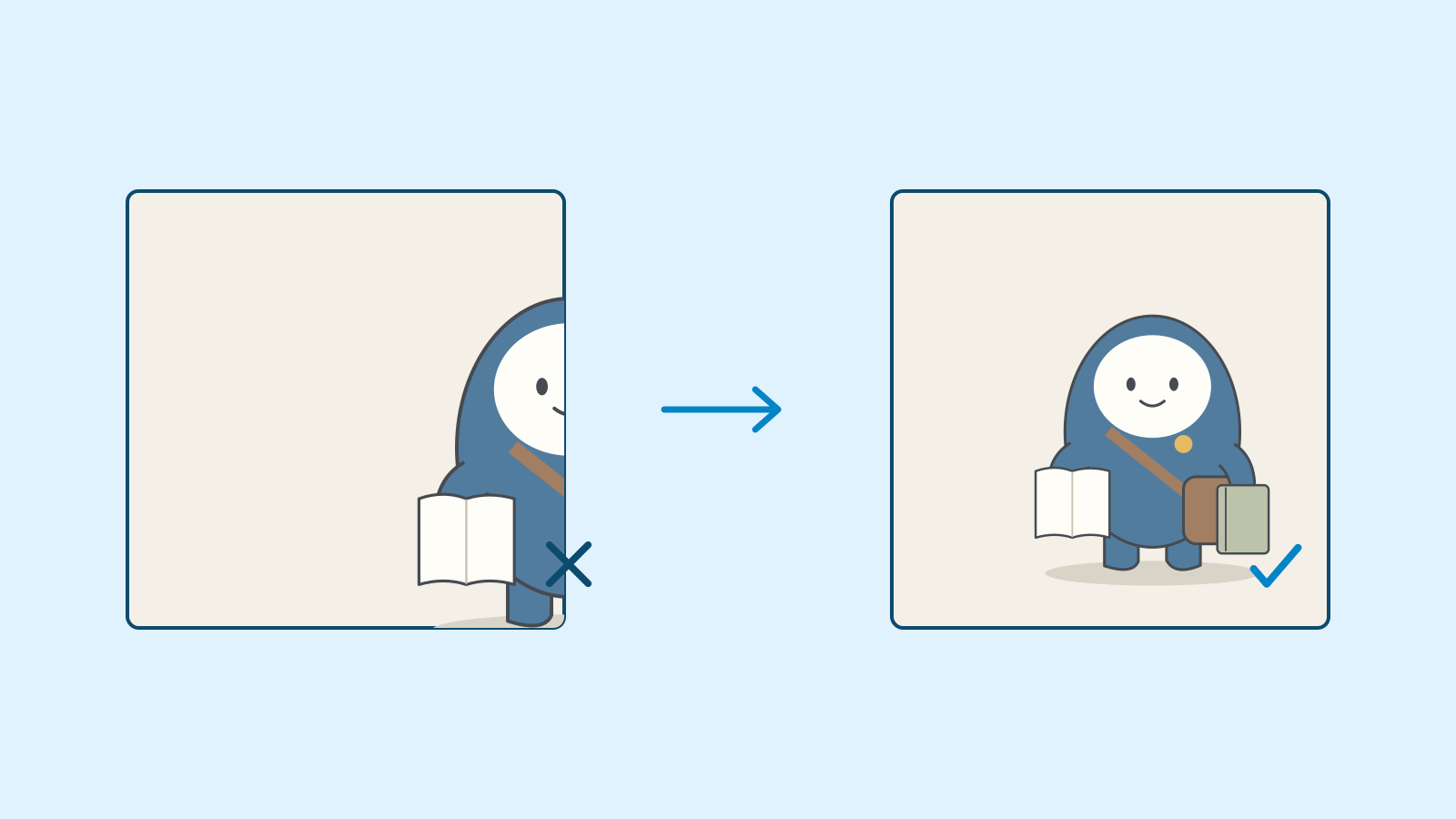
Figure: editor-drawn mockups comparing a clipped crop with proportional resizing and repositioning · AI Ping The usable coordinate ranges are explicit: landscape x=80–1520 and y=80–820; square x and y=64–1016; vertical x=96–984 and y=180–1740. Coordinates increase rightwards and downwards from the top-left corner. You do not need to memorise them: subtracting the margins from the full dimensions gives the allowable region for a different format.
Visual checks cover one Dori, exactly one badge on the correct side, and the presence of both book and notebook. Compare all three files together for identity consistency and look for accidental text-like marks. When returning a defect to an AI, name the failed file, observed difference, editable area and traits that must survive. Those four items become the input for the next revision.
The three supplied SVGs are finished text-free illustration bases. They are not ready-to-publish event announcements. The date, venue and fee still require confirmation and separate typesetting. Once copy is added, check that it does not cover the face or bag and remains readable at the intended display size. Illustration approval and event-information approval are separate completion conditions.
Keep AI suggestions distinct from measured results in the inspection log. “The AI suggested lower-centred placement” records a proposal; “saved file is 1080×1920 and has one badge” records a check. Do not mark unverified items complete. The downloadable specification and example files show how the conditions connect to the supplied results and provide a pattern for recording later revisions.
Completed editor-drawn SVGs, not actual AI-generated or AI-edited outputs File Pixel dimensions Title space / margins Landscape base 1600×900 Left 720px / 80px on all sides Square base 1080×1080 Top / 64px on all sides Vertical base 1080×1920 Top / 96px left and right, 180px top and bottom Worked example & explanation Download the other formats and specification from the following worked-result materials. These are illustration-base deliverables.
Completed square file Format Inspection result 1080×1080 Character and props remain inside the 64px margins Check it
- Inspect whether the left 45% of the landscape is actually clear.
- Compare the square and vertical against the landscape for badge direction and character count.
- Verifying dimensions and margins does not settle the undecided event details.
3 / 4
Check & explain
Think about what you would ask AI, then read the explanation. Written submissions and external AI use are optional.
This is a learning check, not a test you must pass. Use the explanations to understand the ideas.
Q1The landscape looks attractive, but a bookcase fills the left 45%. The AI says it strengthens the reading atmosphere. Should it pass?
Write your thoughts (optional)
Your writing is not sent anywhere. It disappears when you leave or reload this page, so copy anything you want to keep.
Read the answer and explanation
No. In this fictional brief, the left 720 pixels are reserved for the title. The bookcase violates that requirement regardless of atmosphere. Request its removal from the left region while preserving the character on the right.
This is your own review, not an automatic score.
Q2After correcting the body colour, two yellow badges appear; the previous version had one. What should accompany the next AI request?
Write your thoughts (optional)
Your writing is not sent anywhere. It disappears when you leave or reload this page, so copy anything you want to keep.
Read the answer and explanation
Provide the before-and-after files and the invariant of exactly one badge on the viewer’s right chest. Identify count and location as the failed items and preserve the corrected body colour, face and props. Compare the whole image again after the local correction.
This is your own review, not an automatic score.
Q3The bag in the 1080×1920 vertical is 60 pixels from the right edge. This exercise requires 96-pixel side margins. Does the correct canvas size make it pass?
Write your thoughts (optional)
Your writing is not sent anywhere. It disappears when you leave or reload this page, so copy anything you want to keep.
Read the answer and explanation
No: the bag is 36 pixels short of the exercise’s required margin. Request an inward move or proportional reduction in the vertical file. Retain the other formats if they already pass.
This is your own review, not an automatic score.
Q4The fresh writing-group brief reserves the right 40%. The AI says to keep the left 45% empty and retain the book, as before. What needs correcting first?
Write your thoughts (optional)
Your writing is not sent anywhere. It disappears when you leave or reload this page, so copy anything you want to keep.
Read the answer and explanation
Old conversation details have overridden the fresh source. Restate the changed conditions: character on the left, right 40% empty, pencil and closed notebook. Correct the text request before image generation rather than iterating images from the wrong brief.
This is your own review, not an automatic score.
Common mistakes
- Treating a well-structured AI request as proof that the image passed inspection.
- Copying the old reserved-space direction into a new brief.
- Repeating whole-image regeneration despite drift in fixed traits.
- Trusting the filename or requested dimensions instead of checking the saved file.
Your learning record
Completion is optional. Mark this lesson when you feel ready, or move to the next lesson without marking it.
Completion is saved in this browser.
4 / 4
Apply to your work
Consider how new material changes the workflow and checking criteria. Trying an external AI tool is optional.
Try it: repeat the request, revision and checks on a fresh brief
The fresh assignment is an evening writing-group illustration for the same fictional library. It needs a landscape banner and square image, and Dori now holds a pencil and a closed notebook instead of a book. The blue body, white face, brown bag and one viewer-right badge remain fixed. The landscape reserves the right 40% for a title and places Dori on the left. Copying the previous result would therefore preserve the wrong props and empty-space direction.
Read the downloadable brief and separate changed conditions from fixed ones. Check that the old left-45% rule has not slipped into the new request. Ask an AI to prepare the image instruction and unresolved questions; date, venue and fee remain absent. Without using a tool, you can explain what you would send and what kind of reply you would reject.
The new observation note reports two defects: the character and empty space are correctly placed, but there are two yellow badges; cropping the landscape into a square has cut off a notebook corner. Do not combine them into an instruction to remake everything. The badge count is a character-region issue, while the clipped notebook is a square-layout issue. Identify the file and editable area for each and state what must survive.
Completion depends on adapting the request to the fresh brief, retaining unknown information, separating the two corrections and defining checks for count, direction, props and dimensions. Readers without an account can compare the supplied mockups and explain the new errors. Readers who execute the workflow should keep their actual outputs and failure notes, including differences from the worked example.
The reusable part is not a magic prompt that guarantees the same picture. It is the sequence of fixing the source, separating conditions and feeding observed differences into the next request. Output-length failures, edits outside a selection and format-specific cropping need different checks. Before making the next prompt longer, place the current file, conditions and one-sentence defect report side by side.
Changed and fixed conditions in the fresh brief Item New condition What stays fixed Purpose Evening writing group Event details undecided Landscape Dori left; keep right 40% empty Character-side identity Props Pencil and closed notebook Bag and one yellow badge Checks Correct two badges and clipped notebook Preserve passing elements Download the fresh brief (TXT)
Worked example & explanation The completed vertical file from the original reading-group case is available as a comparison. It is not an answer file for the fresh exercise.
Completed vertical file from the worked case Format Inspection result 1080×1920 Character remains inside 96px side and 180px top/bottom margins
Write a note (optional)
Use this only if you want to record a prompt or your understanding. This is a notebook, not a connected AI assistant.
Your writing is not sent anywhere. It disappears when you leave or reload this page, so copy anything you want to keep.
References
- Images in ChatGPT — OpenAI Help Center
- Use generative fill — Adobe Firefly Help