Adapt AI-written imports when a supplier changes its CSV format
Support an explicit second file format, refuse mixed headers and rerun executable checks for zero, missing values and malformed files.
22 min readAs of Nov 2026
Lesson guide · goals & preparation
By the end of this lesson
- Separate the format change from existing behaviour.
- Check rejected input for accidental partial output.

Who this is for
- People adapting an existing converter to a new supplier feed.
What you need
- Know how the previous lesson treats zero, blank and invalid quantities.
1 / 4
Theory
Understand what to ask AI to do, how to ask, and the ideas behind the workflow.
Yesterday’s working importer suddenly holds every item
The supplier renamed count to available_qty. Replacing one spelling everywhere may break the old feed. Accepting whichever nonempty field happens to exist may resurrect stale counts. Declare the expected version and define what stays consistent across versions.
A beginner often asks: why type the version by hand instead of letting the program guess it from the header? Guessing feels convenient, but a broken header would then be matched to the closest version in silence. Declaring v2 means an old count-only file no longer slips through; it stops as a mismatch you can see. The label pins down the promise before any row is read.
Choose a quantity field for each declared version
Read fields by name, since the order may change. The contract lists exactly two allowed names per version. A blank value in a recognised field is a row-level issue. A header that names both quantity fields is a file-level issue: we cannot choose the authoritative quantity.

Illustration: Version-specific headers pass separately; a mixed file stops at the gate · AI Ping
- The two versions name their quantity fields count and available_qty respectively.
- Check the declared version’s exact two headers and read its named quantity field.
- A mixed header produces no output. A blank in valid v2 still produces a held row.
Read every step as text
- v1 names its quantity field count; v2 names it available_qty. A fallback that reads count whenever the new field is empty reports S-4’s old 9 as current stock.
- A file declared as v2 is checked at its header first. It has exactly item and available_qty, so it passes, and quantities are read by that name.
- S-1 carries a valid 0. The output row is S-1,0,ok.
- S-2 has an empty quantity in a correctly formed file. The row is kept as S-2,,hold:missing, so the item to ask about is not lost.
- S-3 becomes 7, ok. All three rows of the valid v2 file are out, in order.
- The mixed file’s header has an extra column, count, which v2 does not allow. No one can say which number to trust, so the file stops before any output.
- Because the file stopped at its header, S-4’s count of 9 is never read. The exit status is 2 and standard output is empty.
- Last, rerun the old v1 file A,0. Its item,count header passes and it still yields A,0,ok, so support grew without changing old behaviour.
You can check this by hand first. Split the header on commas, collect only the field names, then compare that set to the two names v2 allows: item and available_qty. Order does not matter, so sort both and match. available_qty,item passes as the same pair, while an extra count makes the set too large and fails. Reading column two by position would have mistaken the item name for a quantity.
Supplier format note V and sample headers Target Header or record Rule V1 item,count Exactly these columns, either order V2 item,available_qty Exactly these columns, either order New file S-1,0 / S-2,blank / S-3,7 Three V2 rows Mixed file item,count,available_qty / S-4,9,blank Reject whole file, no output
2 / 4
Step by step
Learn what to prepare, how to request help and how to revise the result through examples and explanations.
Tell the assistant what changes and what must still pass
Ask for a narrow change: validate the declared header, choose its one quantity field and reuse quantity parsing. Run a v1 zero sample alongside a valid v2 file and a mixed-header file. The v1 check is a regression test for an existing promise.
To stop the assistant from rewriting the quantity logic, hand it a one-line do-not-change list: keep blank as hold:missing and keep 0 as ok. After it replies, feed the old v1 row A,0 again and confirm A,0,ok still comes out, line for line. If that single row matches yesterday, only the format grew. If 0 now turns into hold, the change reached further than you asked.
Example prompt Design a CSV converter taking an explicit v1 or v2. Accept exactly its two column names in either order. Reject a wrong header or row width before writing any output. Preserve previous quantity rules. Forecast outcomes for v1, v2 and the mixed file. Supplier format note V and sample headers Target | Header or record | Rule V1 | item,count | Exactly these columns, either order V2 | item,available_qty | Exactly these columns, either order New file | S-1,0 / S-2,blank / S-3,7 | Three V2 rows Mixed file | item,count,available_qty / S-4,9,blank | Reject whole file, no output
Find the fallback that crosses format boundaries
The editor’s faulty expression row.get("available_qty") or row.get("count") selects 9 for S-4 even though the new field is blank. Reject the mixed header before reaching S-4. Once a file qualifies as v2, read only available_qty.
Trace why or pulls the old value by hand. In Python an empty string is falsy, so when row.get("available_qty") returns "", or moves on to count. S-4’s new field is blank, so 9 wins. But what if available_qty held "0"? The string "0" is not empty, so it is truthy and the left side stays. The same expression behaves differently per value, which is why blocking it at the header is safer.
Example prompt Remove the fallback that resurrects count=9 for S-4. Validate the header first and read only available_qty for v2. Test that rejected files write no partial CSV.
Worked example & explanation Reject the mixed file as a whole. A blank in a structurally valid v2 row stays visible as hold:missing.
Validate the whole file before writing output
The program validates all rows before writing a header or any output. A malformed late row cannot leave behind a plausible partial CSV. Run python3 inventory_import.py v2 stock-v2.csv on the supplied example. With the test file in the same directory run python3 -m unittest -v test_inventory_import.
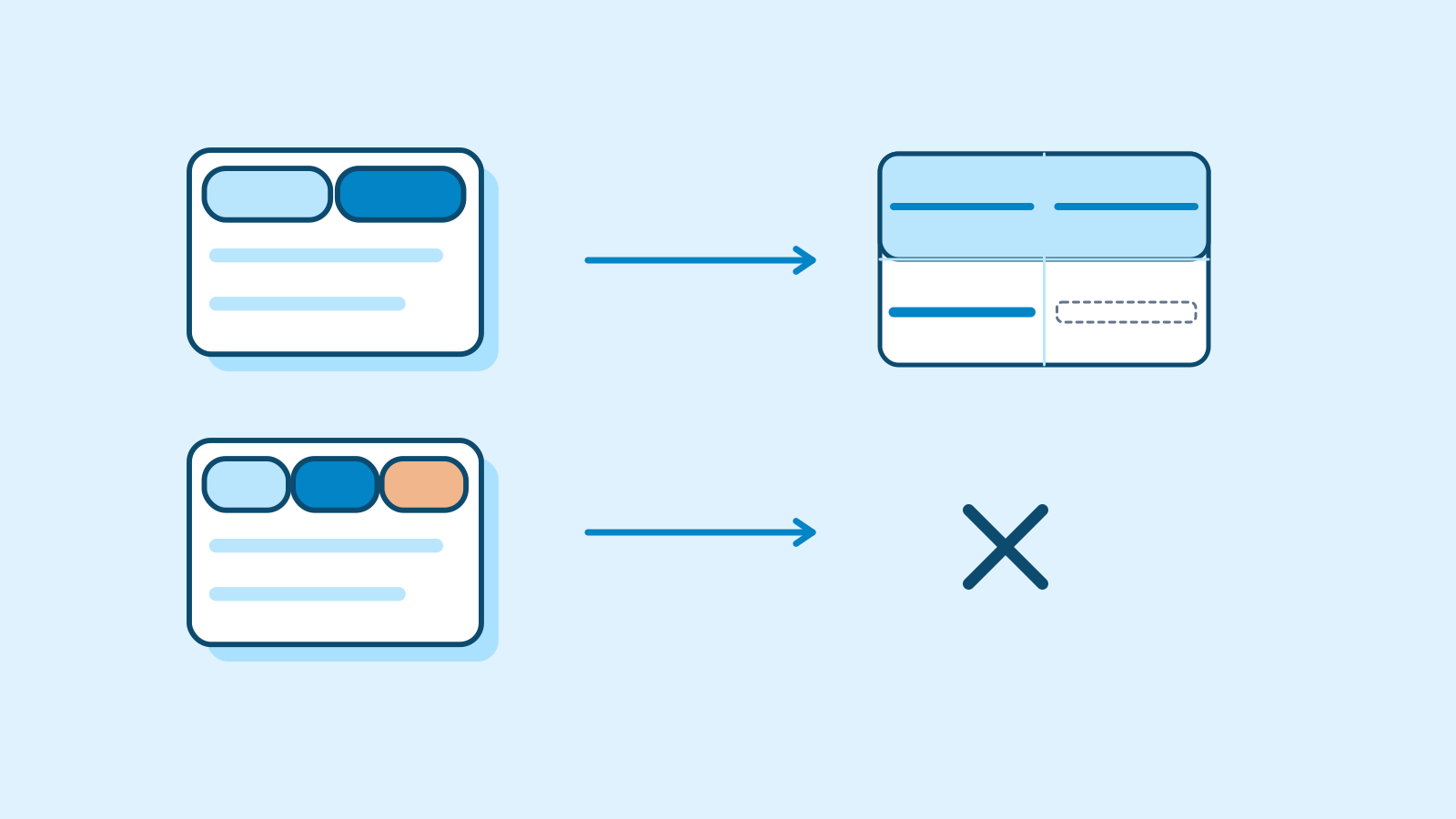
Illustration: The valid file produces output while a rejected file produces none · AI Ping The practice bundle includes stock-mixed.csv. In a shell run python3 inventory_import.py v2 stock-mixed.csv > result.csv, then immediately run echo $? to inspect status 2 before running any other command. Now inspect result.csv: there is no header. Choose a fresh destination; the shell opens and truncates a redirected file before the program can validate the input.
Expected results for three small files Declared version / file Result Check v1 · item,count / A,0 A,0,ok Old format still passes v2 · valid S-1 / S-2 / S-3 S-1,0,ok / S-2,,hold:missing / S-3,7,ok Keep the missing value v2 · mixed file Exit status 2, empty standard output Stops at header
3 / 4
Self-check
Think about what you would ask AI, then read the explanation. Written submissions and external AI use are optional.
This is a learning check, not a test you must pass. Use the explanations to understand the ideas.
Q1Are F and G valid files?
Write your thoughts (optional)
Your writing is not sent anywhere. It disappears when you leave or reload this page, so copy anything you want to keep.
Read the answer and explanation
Both headers are valid. F emits T-1,0,ok and G emits T-2,,hold:missing because order is unrestricted.
This is your own review, not an automatic score.
Q2Should H output 8 for T-3?
Write your thoughts (optional)
Your writing is not sent anywhere. It disappears when you leave or reload this page, so copy anything you want to keep.
Read the answer and explanation
Reject H for an extra count column. Eight is not an authoritative new count, and no CSV should be written.
This is your own review, not an automatic score.
Q3May the importer emit T-4 before rejecting J?
Write your thoughts (optional)
Your writing is not sent anywhere. It disappears when you leave or reload this page, so copy anything you want to keep.
Read the answer and explanation
The contract rejects the entire file on malformed structure. T-5 lacks its second field, so not even an output header should remain.
This is your own review, not an automatic score.
Common mistakes
- Falling back to an old column can revive a stale count.
- Emitting output early may leave a valid-looking partial file.
Your learning record
Completion is optional. Mark this lesson when you feel ready, or move to the next lesson without marking it.
Completion is saved in this browser.
4 / 4
Apply to your work
Consider how new material changes the workflow and checking criteria. Trying an external AI tool is optional.
Try a reordered file and an unexpected field
Classify F, G, H and J separately. Two simply reorder the fields. One supplies both names. Another emits one valid row before a structurally short row. Decide which files should produce any output and distinguish an explicitly blank field from a missing column.
Approach this in order rather than guessing the answers. For each file, look at the header first and decide whether it matches the two names v2 allows. Only files that clear the header move down to the rows, where you separate a blank field from a missing column. Write your expected result for each file on paper, then run the command and compare. Ask yourself at which stage H and J part ways, and let your written prediction meet the real output.
Independent tests, all declared v2 File Header Row (in input order) F available_qty,item 0,T-1 G available_qty,item blank,T-2 H item,available_qty,count T-3,blank,8 J item,available_qty T-4,5 followed by T-5 with no second field
Write a note (optional)
Use this only if you want to record a prompt or your understanding. This is a notebook, not a connected AI assistant.
Your writing is not sent anywhere. It disappears when you leave or reload this page, so copy anything you want to keep.
References
- Get structured (JSON) output from an LLM — AI Ping
- unittest — Unit testing framework — Python Software Foundation